Looking for a Miro alternative?
Nubo Whiteboard is an infinite canvas for sketching, sticky notes and workshops, with live shared boards, dot voting, polls and a timer. It is part of Nubo Hub, next to your mail, chat and meetings. Below are Miro and FigJam list prices as read on 15 November 2026, what Nubo costs in your currency, and when Miro is the better choice.
Miro and Nubo prices
Miro list prices
| Plan | Price | What it is for |
|---|---|---|
| Miro Starter | US$8 | per member per month, billed yearly |
| Miro Business | US$20 | per member per month, billed yearly |
| FigJam Collab seat, Professional | US$3 | per seat per month |
| FigJam Collab seat, Organization | US$5 | per seat per month |
Prices read on 15 November 2026; the sources are listed at the foot of this page. Prices as listed by the vendors; check tax treatment on their pages. Miro plans and prices change; check the vendor’s page before you decide.
 Nubo prices in AUD
| Plan | Price | What it is for |
|---|---|---|
| Nubo Whiteboard Team | A$7 | per user per month, billed annually, A$9 billed monthly |
Nubo prices exclude tax. Taxes are added at checkout where they apply. Also included in Nubo Hub and in Nubo One. See all Nubo prices.
Nubo Whiteboard
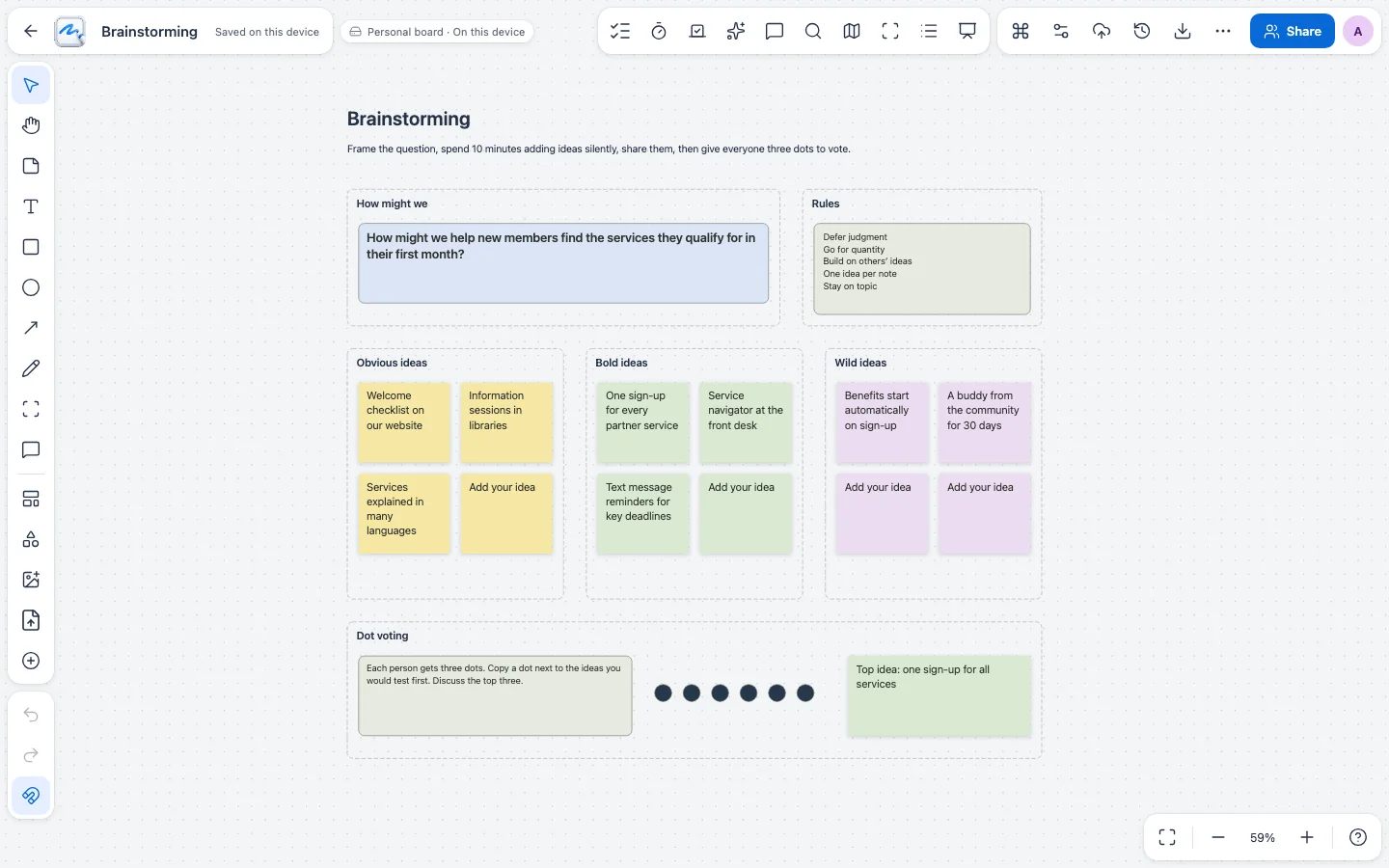
An online whiteboard for teams and workshop leaders. Sketch alone or invite others onto the same board, using sticky notes, frames, freehand drawing and templates, and run a workshop with voting and a timer.
- Infinite canvas. Zoom, pan and fit, with a minimap to jump around.
- Live boards. Named cursors and simultaneous editing.
- 58 templates. In nine categories, with reusable components.
- Workshop tools. Dot voting, polls, reactions and a shared timer.
Whiteboard: all features
- Start with a note, end with a plan.. Place sticky notes, text, shapes, arrows, frames and images, or draw freehand with a mouse, pen or finger. Press Ctrl/Cmd+K to find any command.
- Run the session from the board.. Vote with dots, run polls, keep new notes face down until you reveal them, lock the board and bring everyone to your view. A summary lists contributions and exports to CSV.
- Turn notes into tasks.. Give a note a status, assignee, dates and priority, then open the Tasks view to filter, group and export to CSV or Excel.
How to move from Miro
There is no board importer. Copy the text and images you still need and rebuild the board from one of the templates; sticky notes can be given a status, assignee, dates and priority and exported from the Tasks view as CSV or Excel.
Nubo has no one-click migration tool and no mailbox import. See the switching guides for what moves and what does not.
Questions
- What is Nubo Whiteboard?
- An infinite canvas for teams and workshop leaders, with sticky notes, frames, freehand drawing, templates, dot voting, polls and a shared timer.
- Is Nubo Whiteboard free?
- Whiteboard is included in the Free plan, which needs no card. It is also sold as a paid tier and is included in Nubo One; the price table above shows the current price in your currency.
- Does Nubo Whiteboard support workshop voting?
- Yes. Facilitators can run dot voting and polls, keep new notes face down until they reveal them, lock the board and bring everyone to their view. A summary lists contributions and exports to CSV.
- How do I move my boards from Miro to Nubo Whiteboard?
- There is no importer for another tool’s boards. Rebuild the boards you still need from a template, using the text and images you copy across.
Other jobs Nubo covers
- Zoom alternative
- Slack alternative
- Notion alternative
- Trello alternative
- Google Docs alternative
- Google Sheets alternative
- Airtable alternative
- QuickBooks alternative
- DocuSign alternative
- Postman alternative
- GitHub alternative
- Adobe Acrobat alternative
- Adobe Photoshop alternative
- Adobe Illustrator alternative
- AutoCAD alternative
- Onshape alternative
- Zoho Workplace alternative
- Zoho One alternative
- Zoho CRM alternative
- Zoho Desk alternative
- Zoho Books alternative
- Zoho Projects alternative
- Zoho Sign alternative
- All Nubo alternatives
- Compare Nubo with Microsoft 365, Zoho, Adobe and AutoCAD
- Switching guides
Miro and FigJam are trademarks of their owners. Nubo is not affiliated with, endorsed by or sponsored by the owner of the Miro brand. The competitor prices above were read on 15 November 2026; page reviewed on 16 November 2026.
Sources
- Miro pricing, read on 15 November 2026
- Figma pricing (FigJam Collab seats), read on 15 November 2026