Looking for an AutoCAD alternative?
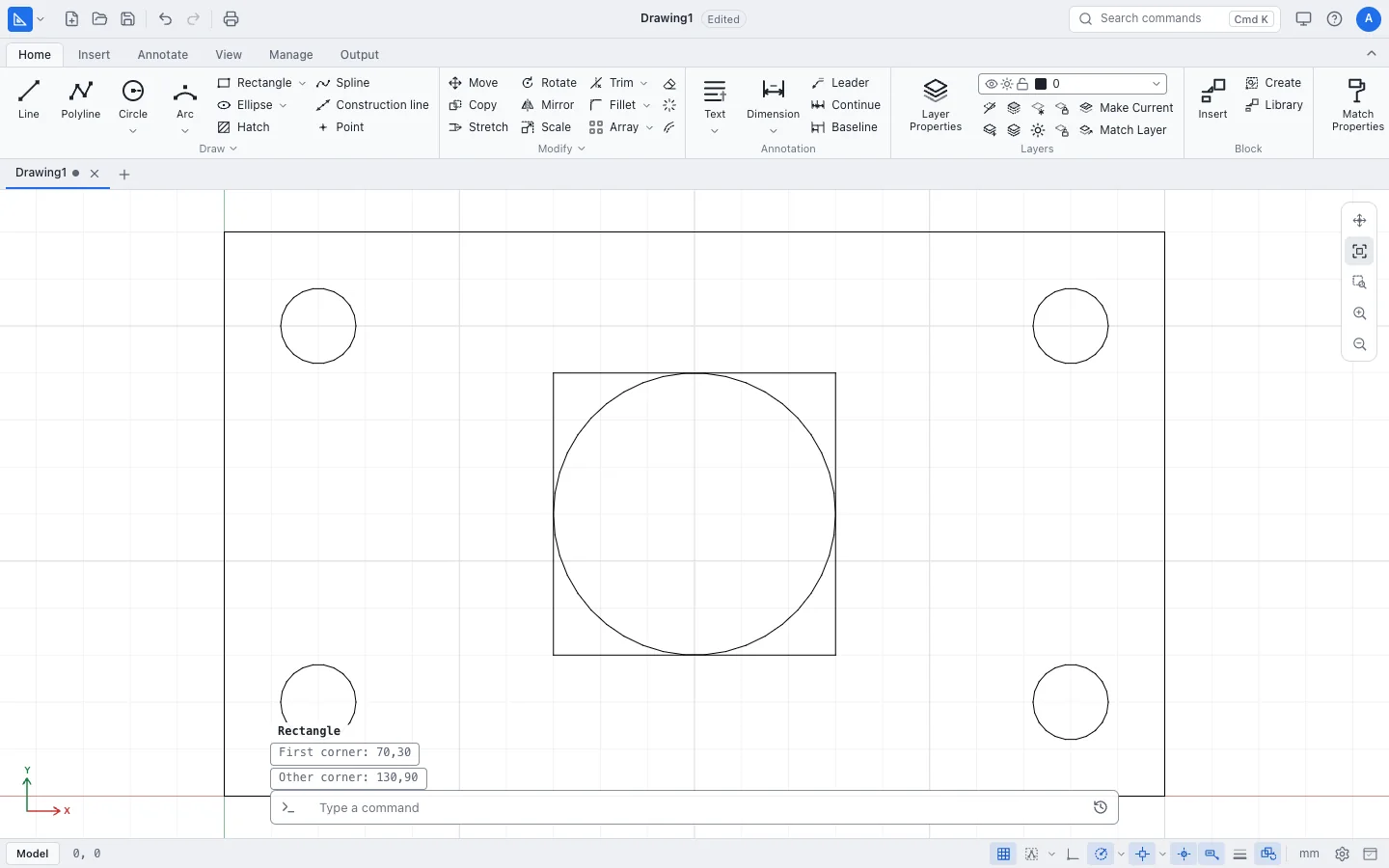
Nubo CAD is an early alpha 2D drafting app in the browser. You draft with exact coordinates from a command line or ribbon, snap to geometry and add dimensions, hatching, layers and blocks. It reads and writes DXF and does not open or save DWG. Below are the AutoCAD prices as shown in search summaries on 15 November 2026, what Nubo costs in your currency, and when AutoCAD is the better choice.
Nubo CAD is an early alpha. Features may change and drawings could be lost, so keep copies of important work. It does not open or save DWG files.
AutoCAD and Nubo prices
AutoCAD list prices
| Plan | Price | What it is for |
|---|---|---|
| AutoCAD | About US$175 | per month, annual plan |
| AutoCAD LT | US$45 | per month |
Prices read on 15 November 2026; the sources are listed at the foot of this page. Check tax treatment on the vendor’s page. These Autodesk figures were read from search summaries of autodesk.com on the date above, not from the pricing page itself, and may be out of date. Check Autodesk’s page for the current price in your country. AutoCAD plans and prices change; check the vendor’s page before you decide.
 Nubo prices in AED
| Plan | Price | What it is for |
|---|---|---|
| Nubo CAD Pro | AED 69 | per user per month, billed annually, AED 86 billed monthly |
Nubo prices exclude tax. Taxes are added at checkout where they apply. Also included in Nubo One. See all Nubo prices.
Nubo CAD
A CAD drafting app for drafters, engineers and makers. Draft with exact coordinates, snap to geometry and dimension the result, working from the command line or the ribbon on a desktop or a tablet.
- Command line. Autocomplete, repeat and coordinates such as @dx,dy.
- Object snaps. Endpoint, midpoint, center, tangent, intersection and more.
- DXF in and out. Read and write R2000 ASCII DXF files.
- Plot to PDF. Standard paper sizes, fit or to scale, with preview.
CAD: all features
- Enter exactly what you mean.. Type absolute, relative or polar coordinates, lock angles, and use polar tracking and ortho. Lines, polylines, arcs, circles, splines and rectangles come with fillets or exact dimensions.
- Change geometry without redrawing.. Move, copy, rotate, mirror, offset, trim, extend, fillet and chamfer. Select by window or crossing, or by property, and stretch with grips.
- Annotate and organize for issue.. Add linear, aligned, angular, radius, diameter and ordinate dimensions, leaders and multiline text. Hatch closed areas, manage layers and reuse blocks.
How to move from AutoCAD
Ask for DXF versions of your drawings and open them in Nubo CAD. It reads and writes R2000 ASCII DXF. Native .cad files and exports to SVG, PNG and PDF are also supported. Nothing moves as DWG.
Nubo has no one-click migration tool and no mailbox import. See the switching guides for what moves and what does not.
Questions
- What is Nubo CAD?
- A 2D drafting app in the browser. You draw with exact coordinates from a command line or ribbon, snap to geometry and add dimensions, hatching, layers and blocks.
- Is Nubo CAD free?
- No. CAD is sold per user as a paid tier and is included in Nubo One. It is also an early alpha: features may change and drawings could be lost, so keep copies of important work.
- Does Nubo CAD open DWG files?
- No. It reads and writes R2000 ASCII DXF and its own .cad files, and exports to SVG, PNG and PDF.
- How do I move my drawings from AutoCAD to Nubo CAD?
- Export your drawings as DXF and open them in Nubo CAD. Check the result against the original before you rely on it.
Other jobs Nubo covers
- Zoom alternative
- Slack alternative
- Notion alternative
- Trello alternative
- Google Docs alternative
- Google Sheets alternative
- Airtable alternative
- QuickBooks alternative
- DocuSign alternative
- Miro alternative
- Postman alternative
- GitHub alternative
- Adobe Acrobat alternative
- Adobe Photoshop alternative
- Adobe Illustrator alternative
- Onshape alternative
- Zoho Workplace alternative
- Zoho One alternative
- Zoho CRM alternative
- Zoho Desk alternative
- Zoho Books alternative
- Zoho Projects alternative
- Zoho Sign alternative
- All Nubo alternatives
- Compare Nubo with Microsoft 365, Zoho, Adobe and AutoCAD
- Switching guides
AutoCAD and DWG are registered trademarks of Autodesk, Inc. Nubo is not affiliated with, endorsed by or sponsored by the owner of the AutoCAD brand. The competitor prices above were read on 15 November 2026; page reviewed on 16 November 2026.
Sources
- Autodesk AutoCAD (price as shown in search summaries, may be out of date), read on 15 November 2026